This website uses cookies
This website uses cookies. For further information on how we use cookies you can read our Privacy and Cookie notice
This website uses cookies. For further information on how we use cookies you can read our Privacy and Cookie notice


Few units left

Free return within 15 days for all eligible items.Details
NAWINA SHOP
94%Seller Score
17 Followers
Shipping speed: Good
Quality Score: Excellent
Cancellation Rate: Excellent
MULTI-STANDARD SATELLITE SIGNAL METER — GTMEDIA V8 Finder Pro 2 supports DVB-S/S2/S2X satellite signals and DVB-T/T2/C terrestrial and cable signals for installation, alignment, and reception troubleshooting. On-screen signal strength and quality readings help fine-tune reception, while H.264/H.265 10-bit hardware decoding supports viewing compatible broadcasts
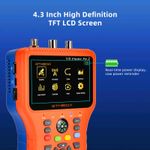
4.3-INCH SCREEN & DISH ALIGNMENT TOOLS — A 4.3-inch TFT LCD with 800 × 480 resolution displays signal readings, setup menus, and received channels. Built-in compass functionality, AZ/EL angle calculation, and an audible signal-lock alert help guide dish positioning. Supports DiSEqC 1.0/1.1/1.2, Unicable, and 0/22kHz switching for compatible installations
SPECTRUM ANALYZER & MULTIPLE SCAN MODES — Examine signal conditions with the spectrum analyzer and access Loop Search for reception checks during setup. Auto, Blind, Manual, and NIT scan modes provide flexible channel-search options. Dedicated SPEC and LOOP buttons offer convenient access to frequently used tools
4000mAh RECHARGEABLE BATTERY — A built-in 7.4V/4000mAh lithium-ion battery provides approximately 3 hours of satellite finding or 5 hours of AV-input playback. Battery-level display and a low-power reminder help manage charging during installation work. Actual runtime varies with operating conditions and connected equipment
AHD CAMERA TESTING & FLEXIBLE CONNECTIONS — Test compatible AHD cameras with video input support up to 1080P. HDMI output connects to an external display, while AV input supports compatible video sources. The USB port supports software updates, media playback, and PVR recording with compatible USB storage, extending use beyond satellite dish alignment
HOW TO ALIGN YOUR SATELLITE DISH — Connect the dish cable to LNB IN and open the Satellite menu. Select the target satellite, enter the correct LNB frequency and transponder settings, and configure DiSEqC settings when needed. Slowly adjust the dish while monitoring signal quality and the lock alert. After achieving a stable lock, run TP Search or Blind Scan to search for channels
1 * V8 FINDER PRO Satellite Finder Meter
1 * Charger
1 * AV cable
1 * Portable Bag
1 * User manual

This product has no ratings yet.