
HomeFashionWatches & SunglassesMen's WatchesAnalogueNew Men's Digital Sports Watch, Fashionable, Chronograph And Polycarbonate Case with TPU Band - Black


Share this product
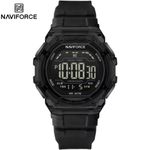
Naviforce New Men's Digital Sports Watch, Fashionable, Chronograph And Polycarbonate Case with TPU Band - Black
Brand: Naviforce | Similar products from Naviforce
GH₵ 380
1 units left
Need advice or assistance to place an order? Contact us at 0302740642
3 out of 5
(1 verified rating)Delivery & Returns
Choose your location
Pickup Station
Delivery Fees GH₵ 14
Ready for pickup between 23 November and 25 November if you place your order within the next 15hrs 36mins
Return Policy
Free return within 15 days for all eligible items.Details
Seller Information
Eden Home Ventures
40%Seller Score
12 Followers
Seller Performance
Shipping speed: Good
Quality Score: Very Poor
Customer Rating: Good
Cancellation Rate: Very Poor
Product details
This Naviforce NF7136 wristwatch features a clear, transparent case and a black silicone strap.
To adjust the time, date, and settings on your Naviforce NF7136 Transparent Digital Watch, follow this step-by-step guide using the four buttons located around the case edge:
Top-Left: LIGHT
Bottom-Left: MODE
Top-Right: ST/STP (Start / Stop)
Bottom-Right: RESET
????️ Setting Time and Date
Enter Time-Setting Mode: Press the MODE button three times from the normal time display screen. The seconds digits will begin flashing.
Reset Seconds: Press the ST/STP button to reset the flashing seconds value back to zero.
Select Hour: Press the RESET button once. The hour digits will start flashing.
Adjust Hour (and 12/24H format): Press the ST/STP button repeatedly to advance the hours value. Pay attention to the cycling format:
If you see "P" or "A" next to the time, it is in 12-hour format (P for PM, A for AM).
If you cycle further and see an "H", it is in 24-hour military time format.
Select Minutes: Press the RESET button again to make the minute digits flash. Press ST/STP to change the value.
Select Date & Day: Continue pressing the RESET button to advance through the remaining calendar settings in this order: Month ➔ Day of the Month ➔ Day of the Week. Use the ST/STP button to increase the values for each section.
Save and Exit: Press the MODE button once to finalize your changes and return to the normal timekeeping screen.
Using Other Modes
1. Chronograph (Stopwatch) Mode
Open: Press the MODE button once from the home screen.
Start/Pause: Press ST/STP to start the timer, and press it again to pause.
Clear: While paused, press the RESET button to clear the digits back to zero. Press MODE to exit.
2. Alarm Mode (ALM)
Open: Press the MODE button two times from the home screen.
Set Time: Hold down RESET or press RESET to select hours/minutes, and use ST/STP to change the alarm time.
Toggle Alarm/Hourly Chime: Pressing ST/STP while in the main alarm screen will activate or deactivate the Alarm (ALM) and the Hourly Chime (SIG).
3. Backlight
Press the LIGHT button at any time to turn on the high-brightness LED screen light for low-light visibility.
Specifications
Key Features
Chronograph
Digital
Fashionable
What’s in the box
1 Original Premium Naviforce Wrist Watch
Specifications
- SKU: NA496FC584R7ONAFAMZ
- Production Country: China
- Weight (kg): 0.54kg
- Color: Black
Verified Customer Feedback
See AllVerified Ratings (1)
3/5
3 out of 5
1 verified rating
Comments from Verified Purchases (0)

Customers who have bought this product have not yet posted comments
Naviforce New Men's Digital Sports Watch, Fashionable, Chronograph And Polycarbonate Case with TPU Band - Black
GH₵ 380
Questions about this product?